From the author
iOS Daily
One essential iOS development article a day, with a short summary. Free on Telegram.
Learn More →When a crash happens deep inside concurrent code, the first question is always: which task did this? Pthreads had names, Grand Central Dispatch had queue labels — they show up in stack traces, in Instruments lanes, in debugger output. Swift Concurrency had none of that until SE-0469, implemented in Swift 6.2.
Naming tasks
The name parameter is optional on most explicit task creation APIs, so you can add names without touching existing code. The examples below all build on the same scenario: loading a user's data.
Let's start with unstructured tasks:
Task(name: "Load profile \(userID)") {
    await loadProfile(id: userID)
}
Detached tasks inherit no actor context, so they suit background work like prefetching:
Task.detached(name: "Prefetch profile \(userID)") {
    await loadProfile(id: userID)
}
Task groups let you name each concurrent piece of work independently:
Task(name: "Load user \(userID)") {
    await withTaskGroup(of: Void.self) { group in
        group.addTask(name: "Load profile \(userID)") {
            await loadProfile(id: userID)
        }
        group.addTask(name: "Load posts \(userID)") {
            await loadPosts(id: userID)
        }
        await group.waitForAll()
    }
}
The same name parameter is also available on addTaskUnlessCancelled, on all throwing and discarding task group variants, and on immediate tasks: Task.immediate, Task.immediateDetached, and addImmediateTask.
Names are set at creation only, and there is no setter. The parameter is optional everywhere, so unnamed tasks remain the default.
SwiftUI task modifier
The .task view modifier also accepts a name parameter:
struct ContentView: View {
    let userID: Int

    var body: some View {
        UserProfileView()
            .task(name: "Load profile \(userID)") {
                await loadProfile(id: userID)
            }
    }
}
The id variant cancels and restarts the task whenever userID changes, keeping the name in sync:
.task(id: userID, name: "Load profile \(userID)") {
    await loadProfile(id: userID)
}
If you leave name as nil on a supported operating system, SwiftUI generates a default name from the call site using file and line, for example:
View.task @ TaskExample/ContentView.swift:6
This is useful when you want every view task to be identifiable without hand-writing a label for each one.
The SwiftUI overloads keep the existing .task behaviour on older operating systems, but the name, file, and line arguments are ignored before Apple platforms 26.4. The task still starts, cancels, and restarts as usual; it just does not receive your custom or generated name.
Reading the name at runtime
A static property gives you the current task's name from inside the task body:
Task(name: "Load profile \(userID)") {
    print(Task.name ?? "unnamed") // "Load profile 42"
    await loadProfile(id: userID)
}
Inside a task group the same property resolves to each child's own name:
group.addTask(name: "Load profile \(userID)") {
    print(Task.name ?? "unnamed") // "Load profile 42"
    await loadProfile(id: userID)
}
Starting in Swift 6.4, the instance property lets you read the name off a task reference after creation. It requires iOS 27, macOS 27, or a matching OS version on other Apple platforms:
let task = Task(name: "Load profile \(userID)") {
    await loadProfile(id: userID)
}
print(task.name ?? "unnamed") // "Load profile 42"
UnsafeCurrentTask gains the same instance property under the same unsafe lifetime rules as its other properties:
withUnsafeCurrentTask { task in
    print(task?.name ?? "unnamed")
}
Custom TaskExecutor implementations can use job.unsafeCurrentTask?.name to log which named task they are about to run. This gives you executor-level tracing without adding instrumentation inside every closure.
Debugging with LLDB
When paused at a breakpoint inside an async function, language swift task info prints information about the current task. Start with a simple named task:
Task(name: "Load profile \(userID)") {
    await loadProfile(id: userID) // set breakpoint here
}
(lldb) language swift task info
(UnsafeCurrentTask) current_task = "Load profile 42" id:5 flags:running {
address = 0x104049a40
id = 5
enqueuePriority = .high
parent = nil
children = {}
}The name appears right after current_task =. For the whole hierarchy, use language swift task tree. It prints every discovered task with its name, state, and a short backtrace. The --max-frames option limits the backtrace length:
(lldb) language swift task tree --max-frames 1
├╴ Task 1, addr = 0x100595880 [awaiting Task 2] [suspended]
│    frame #0: Task<>.value.getter
└╴ Task 2 ('Load profile 42'), addr = 0x100596f10 [running]
     frame #0: closure #1 in  + 36 at main.swift:4:27
Unnamed tasks show only their id, and [awaiting Task 2] tells you which task is blocked on which. language swift task list prints the same tasks as a flat list.
With a task group, language swift task info has a limitation. It only traverses the parent task's runtime children linked list, and task group children are linked there one at a time. In current LLDB output, you may only see one group child, even if several are running concurrently. language swift task tree has the same gap:
(lldb) language swift task tree --max-frames 1
├╴ Task 1, addr = 0x1006598a0 [awaiting Task 2] [suspended]
│    frame #0: Task<>.value.getter
└╴ Task 2 ('Load user 42'), addr = 0x10065b150 [suspended]
   │ frame #0: TaskGroup.next(isolation:)
   └╴ Task 3 ('Load profile 42'), addr = 0x10065ba30 [suspended]
        frame #0: specialized static Task<>._sleep<A>(until:tolerance:clock:)
LLDB currently discovers tasks by walking threads and the links between tasks, so suspended group children can be missed.
To see all named children at once, use Xcode's Variables View panel instead. Set a breakpoint on await group.waitForAll(). In this example, the child tasks are long-running enough to inspect while the parent is waiting. Expand the group variable in the bottom panel:
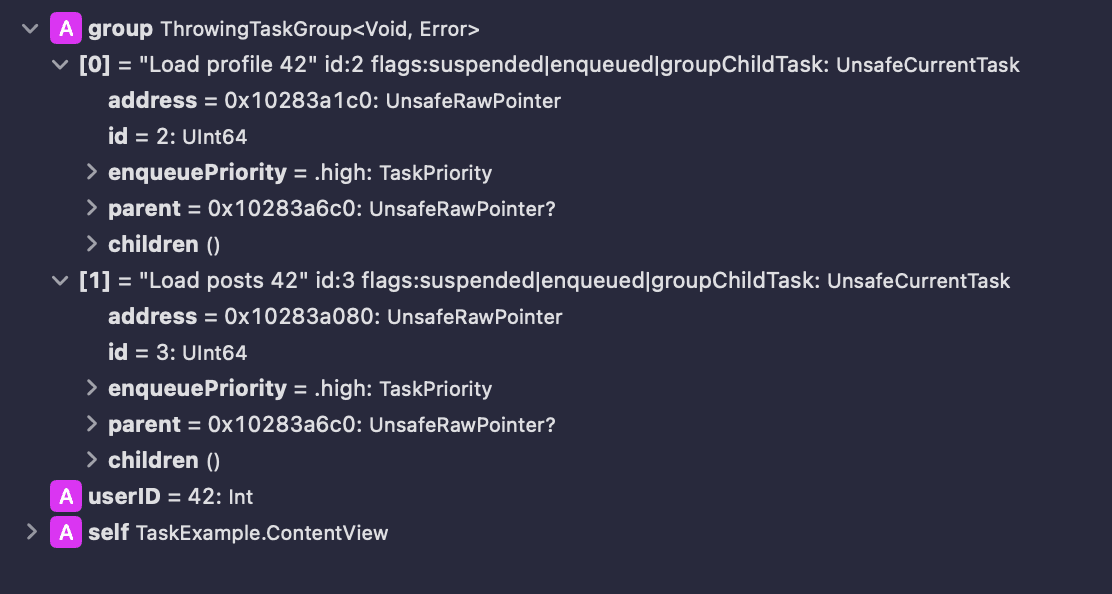
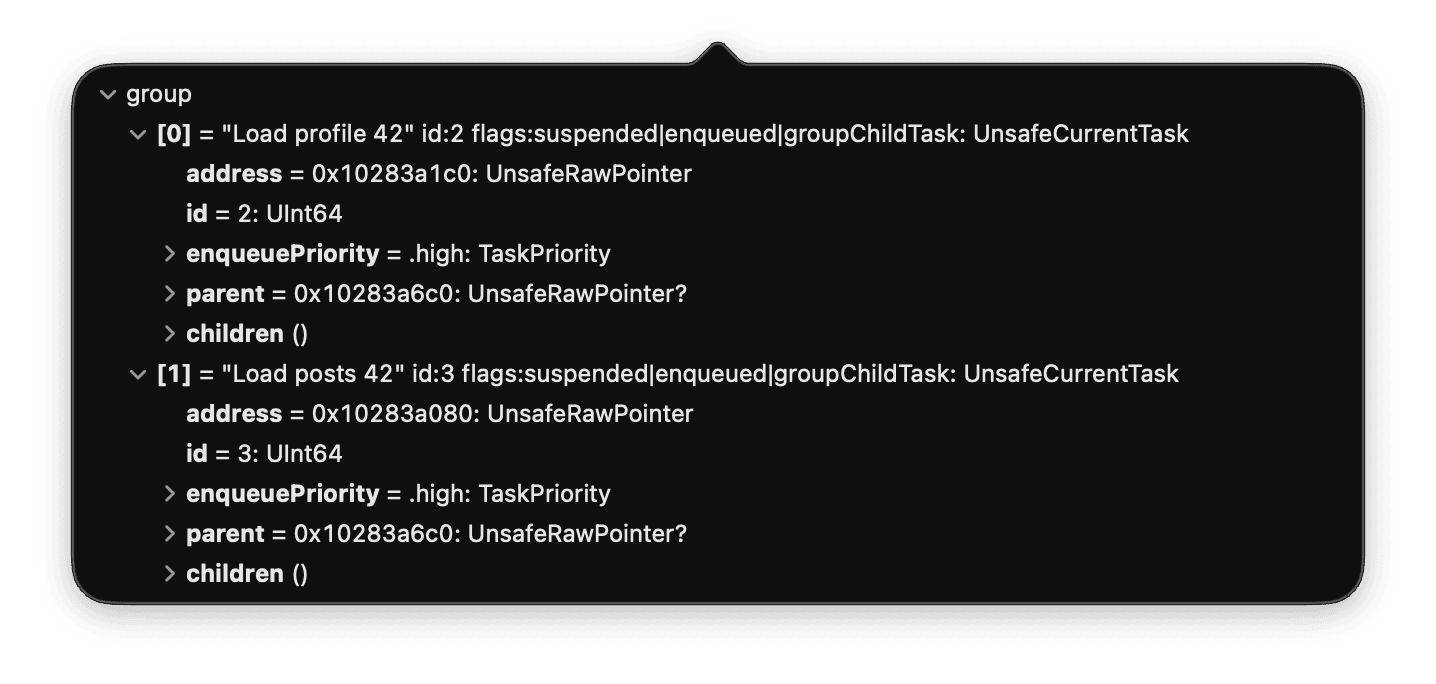
You can also hover over the group variable in the code and click the eye icon to get a Quick Look popup with the same data:
The flags also show cancellation. Set a breakpoint inside a child's cancellation catch block to catch the moment after task.cancel() propagates:
let task = Task(name: "Load user \(userID)") {
    try await withThrowingTaskGroup(of: Void.self) { group in
        group.addTask(name: "Load profile \(userID)") {
            do {
                try Task.checkCancellation()
                await loadProfile(id: userID)
            } catch is CancellationError {
                print("\(Task.name!) cancelled") // set breakpoint here
            }
        }
        group.addTask(name: "Load posts \(userID)") {
            await loadPosts(id: userID)
        }
        try await group.waitForAll()
    }
}

task.cancel()
When the breakpoint hits inside "Load profile 42", language swift task info shows the child's own cancelled state:
(UnsafeCurrentTask) current_task = "Load profile 42" id:2 flags:running|cancelled|groupChildTask {
  address = 0x106248c80
  id = 2
  enqueuePriority = .high
  parent = 0x10624b700 {}
  children = {}
}
The async let limitation
async let tasks cannot be named because the syntax has no place to attach a string. You can see this in the debugger. Take this variant of the loading example:
let task = Task(name: "Load user \(userID)") {
    async let profile = loadProfile(id: userID)
    async let posts = loadPosts(id: userID)
    _ = await (profile, posts) // set breakpoint here
}
Pausing inside the parent body and running language swift task info shows the children without names:
(UnsafeCurrentTask) current_task = "Load user 42" id:1 flags:running {
  address = 0x106438dc0
  id = 1
  enqueuePriority = .high
  parent = nil
  children = {
    0 = id:3 flags:suspended|enqueued|asyncLetTask {
      address = 0x1064f8a10
      id = 3
      enqueuePriority = .high
      parent = 0x106438dc0 {}
      children = {}
    }
    1 = id:2 flags:suspended|enqueued|asyncLetTask {
      address = 0x1064f8790
      id = 2
      enqueuePriority = .high
      parent = 0x106438dc0 {}
      children = {}
    }
  }
}
The parent has its name, but the children show only address and id. The asyncLetTask flag confirms how they were created. If you need named children, use a task group instead.
Profiling named tasks in Instruments
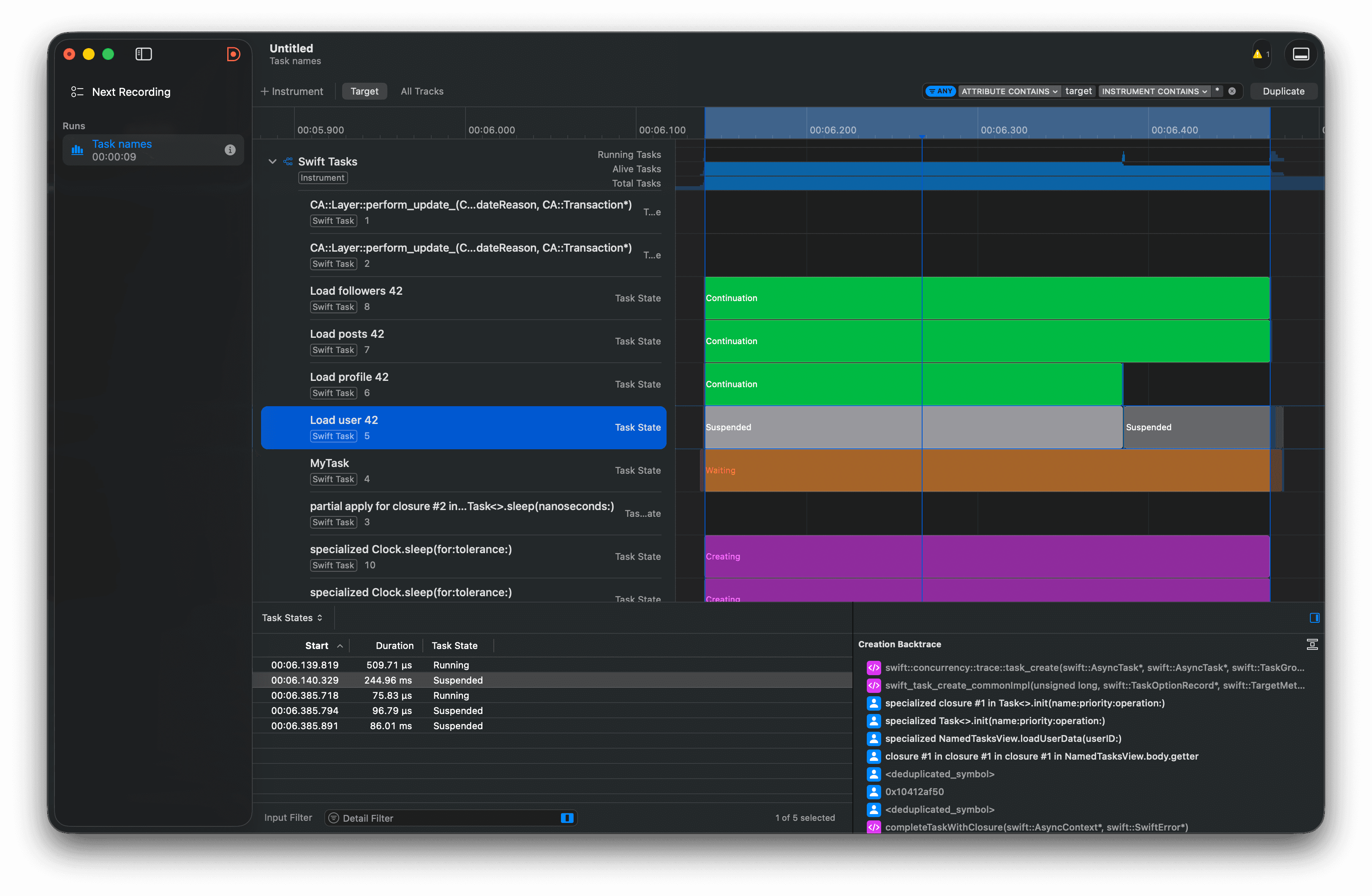
The Swift Concurrency template in Xcode Instruments displays named tasks as separate rows in the timeline. In this trace, the parent "Load user 42" task is selected, while child tasks such as "Load profile 42", "Load posts 42", and "Load followers 42" appear above it with their own state bars. The detail panes show when the selected task was running or suspended, and the creation backtrace points back to the Task(name:priority:operation:) call that created it.
Availability
Task naming is split between Swift language support and framework or runtime support. The core task creation APIs compile with Swift 6.2 for any deployment target, but reading names and SwiftUI task names depend on the operating system.
| API | Minimum |
|---|---|
Task(name:), Task.detached(name:), addTask(name:), addTaskUnlessCancelled(name:) | Swift 6.2 |
Task.immediate(name:), Task.immediateDetached(name:), addImmediateTask(name:) | Swift 6.2, Apple platforms 26 |
Task.name (static, reads current task) | Swift 6.2, Apple platforms 26 |
.task(name:), .task(id:name:) (SwiftUI) | Apple platforms 26.4 for task names; older .task behaviour is unchanged |
task.name (instance), UnsafeCurrentTask.name | Swift 6.4, Apple platforms 27 |
The static Task.name property landed with the main proposal, so it is the portable way to read the current task's name from inside task code. The instance task.name property was added later as an amendment after the original proposal accidentally omitted it, so it requires Swift 6.4 and Apple platforms 27.
Naming guidance
Treat task names as diagnostics, not program state. They should help you identify work in a debugger, profiler, or log, but your app logic should still use explicit values or task-local state.
Keep names short and action-oriented. "Load profile" is often enough, and "Load profile \(userID)" is useful when several similar tasks can run at once. Avoid putting secrets, access tokens, email addresses, full URLs, or other sensitive values in task names because they can appear in debugger output and profiling traces.